
A Brief Guide to the «RADIUS» Online Calculator
Operational Principle: «RADIUS» type gates use segmented movement along a curved path. The leaf consists of vertical sections connected by heavy-duty articulated hinges. This allows the gates to smoothly «bypass» obstacles and turn along a fence or wall at any required angle. The main advantage is the ability to organize an entrance where there is not enough space for a classic linear sliding gate.
For quick operation with the calculator, simply enter one parameter — «Entrance Width A1» and click «Calculate». After an instant calculation, you will see tables below with calculation parameters and a list of necessary hardware for the self-production of Radius turning gates.
To see the prices and study all necessary hardware, click the «Checkout» button. In a few seconds, the calculator will redirect you to the checkout page, where you will find all prices, photos, and links to the components.
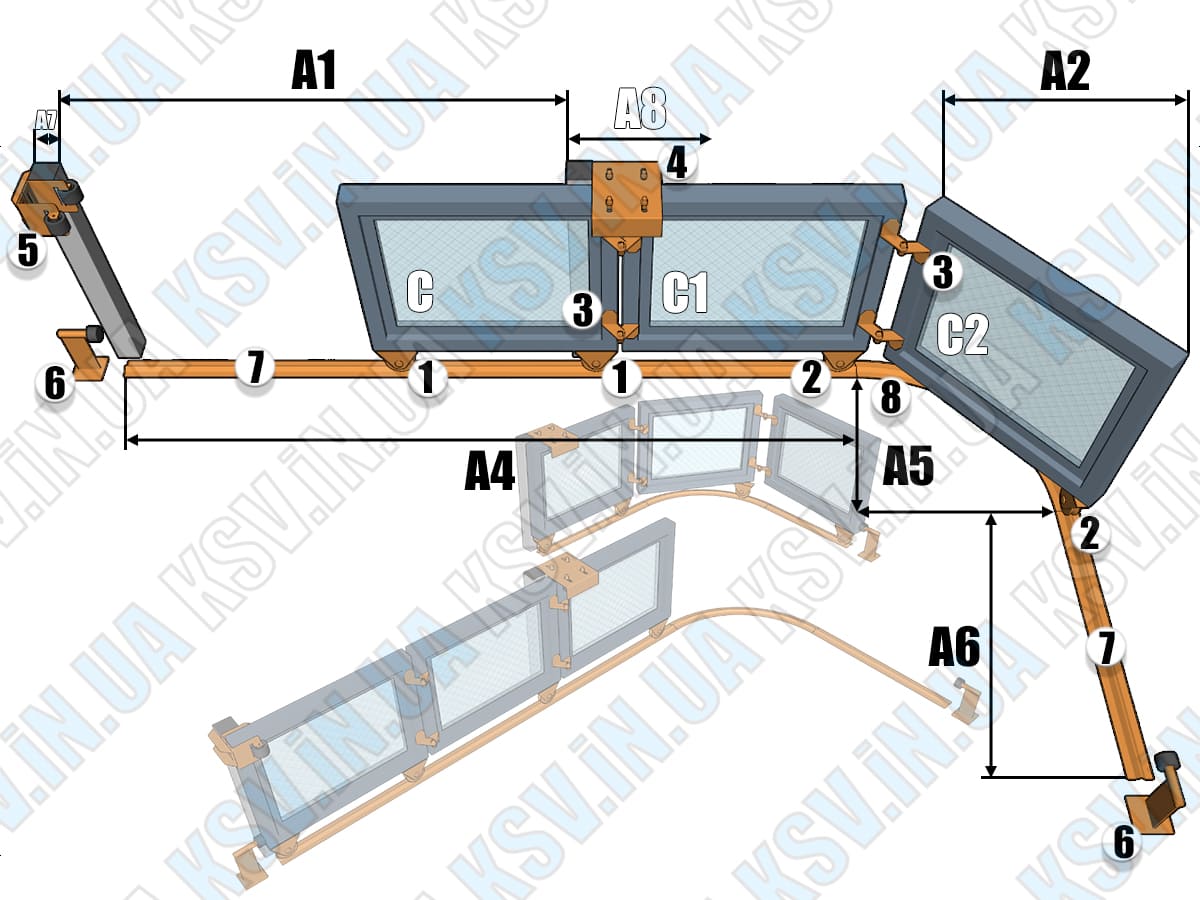
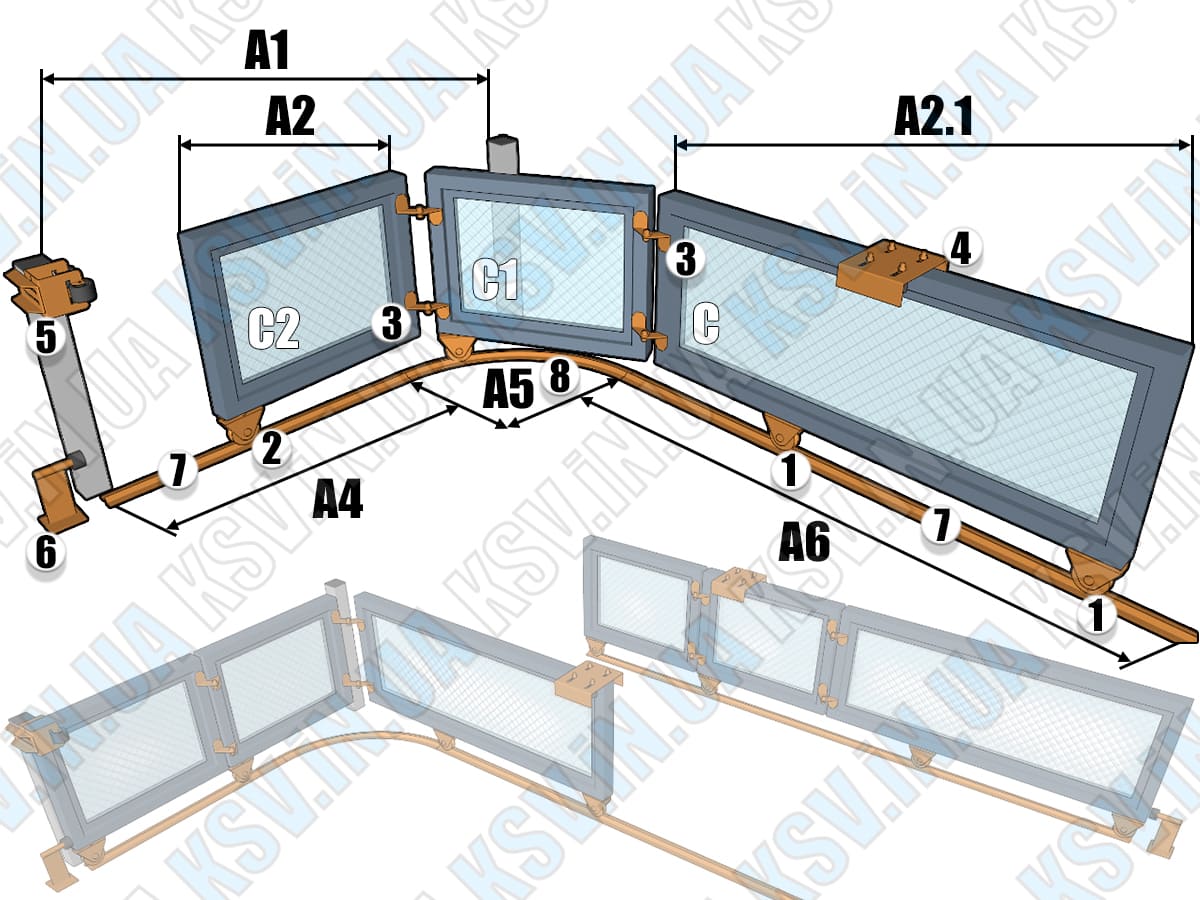
The calculator shows two mounting diagrams as examples, the difference between which depends on the operation mode. The diagrams show a 3-section gate: one fixed section «C» and two turning sections «C1» and «C2». In reality, your gate can have any number of sections. The sections can move in any direction (the diagrams show a right-side opening for illustration).
Diagram Markings (A1-A8 and №1-№8)
| Components (№) | |
|---|---|
| 1 | Fixed support roller |
| 2 | Turning support roller |
| 3 | Section connection hinge |
| 4 | Upper guide rollers |
| 5 | Upper catcher |
| 6 | Bottom stopper |
| 7 | Bottom guide profile |
| 8 | Radius profile (curved) |
| Dimensions and Zones (A) | |
|---|---|
| A1 | Entrance width |
| A2 | Section width |
| A2.1 | Fixed section width |
| A3 | Number of sections |
| A4 | Bottom guide (closed) |
| A5 | Radius profile (arc R=0.5/0.75/1.0m) |
| A6 | Bottom guide (open) |
| A7 | Upper catcher space (10 cm) |
| A8 | Drive unit space (40 cm)* |
* The electric drive is installed approximately under the upper rollers №4.
Calculator Operating Modes
• Standard Mode
Suitable if your site allows for the installation of a bottom guide A4 that is slightly larger than the entrance width A1 (side space available).
• «Limited Rollback» Mode
For sites where there is almost no side space. The guide A4 + curved radius profile A5 are installed across the entire width of the entrance A1.
How to determine the required mode?
In standard mode, enter width A1 and click «Calculate». Then use the formula: (A4 + A5 - A1). If the result is greater than the actual space at your site, switch the calculator to «Limited Rollback» mode.
ℹ️ Important: The calculator does not estimate materials for the section frames and does not account for the gate height (this is not required for hardware selection). You can calculate pipes and get drawings based on values A2 and A2.1 in our other calculators:
All Gate Calculators →Before calling the store — please read the text above carefully once more. It describes all letter (A1-A8) and number (№1-№8) designations in detail.